There’s a small fortune sitting in your inbox.
Old clients. The exec who hired you once. The founder who said “let’s talk in the spring.” Lil’ finds the few people to write this week, drafts the first line, and you send it from your own inbox. Three a week, and no list to keep.
No card required. Skip a week and nothing piles up.
Lil’ looked through your network. These three stood out.
These people would be glad to hear from you.
A dozen back-and-forth emails, then quiet for over a year.
Hey Sarah, it’s been a minute since we were last in touch. How’s everything on your end?
Marcus was the last to email you, and you haven’t replied since spring.
You met on a calendar invite, emailed for a while, then nine months of quiet.
Want to see who else is in there? Open Lil’.
Questions, or a pick that landed wrong? Hit reply.
Two more picks below the fold, every week. Then someone writes back, and that’s how the next digest opens.
A reply came in while another good relationship slowed down, and someone in this week’s picks would be glad to hear from you. Lil’ keeps those moments from disappearing under newer names.
How your week goes with Lil’.
Connect once.
Link Gmail and Google Calendar. Lil’ sees who you email and meet with, and when.

See what matters today.
Today brings up zero to three relationships when the timing supports a useful next move: a reply, an email you may owe, a follow-up that is due, a goal-connected relationship ready for attention, or a good connection going quiet.

Ask when someone is on your mind.
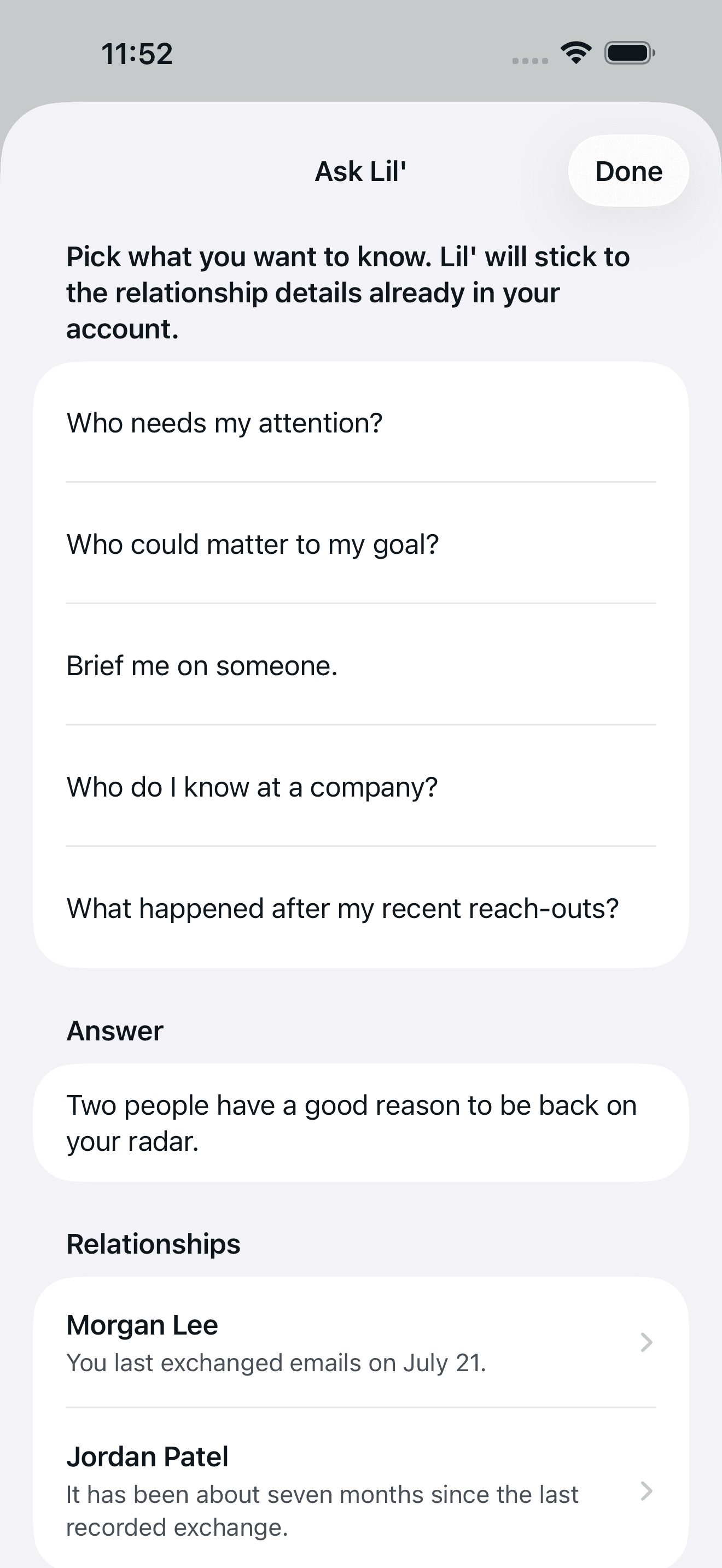
Ask who to write today, how someone fits the goal you set, what Lil’ knows about a person or a company, or what happened after you reached out. Every answer comes from what Lil’ has saved about your people.

The digest still lands every week.
Nothing about it changes. Today handles the useful moments in between.

Built for people whose work is their network.
If your work comes from people you know, reaching back out at the right time matters.
- AgenciesA past client you haven’t emailed in a year.
- RecruitersSomeone you placed, quiet ever since.
- FoundersAn investor you owe an update.
- FractionalsAn exec who hired you, long out of touch.
The relationship tool that brings the work to you.
Dex and Monica are rolodexes you keep up by hand. Lil’ keeps the rhythm for you.
- You tag and file every contact
- You log notes after every call
- You set your own reminders
- It only works if you keep it up
- Reads who you talk to on its own
- Writes the first message for you
- Circles back when you reach out and hear nothing
- Shows up every week, no upkeep
From Dex’s and Monica’s public sites, August 2026.
Upgrade and take it further.
Example data
Say you owe Sarah Chen a reply and the week got away from you, or a good thread with her has not moved in a while. With Paid, Lil’ brings her up on Today the next morning, while the thread is still warm. On Free, she comes up in your weekly digest, on the day you picked.
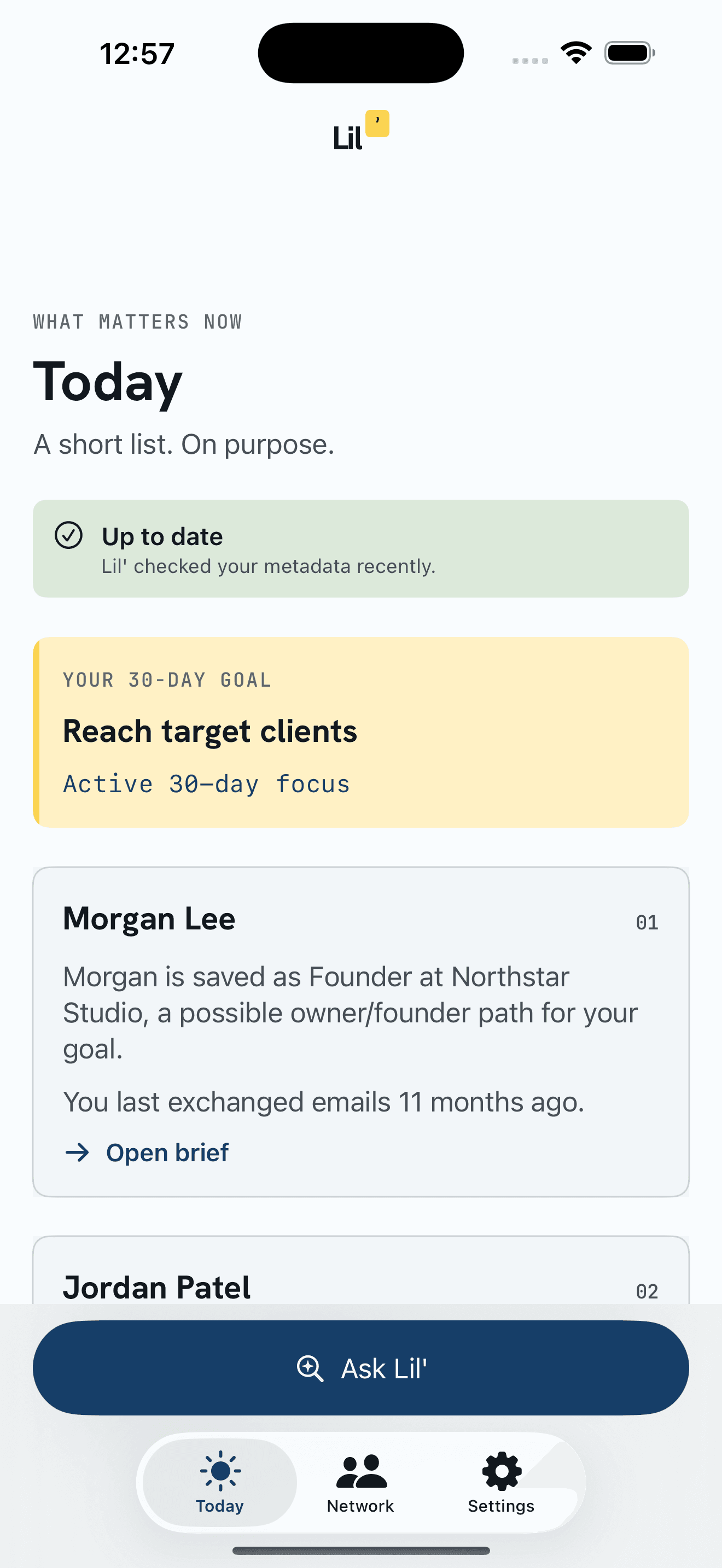
Free still brings you three people a week, first line written.
Give your network a goal.
Set the goal in your own words. Lil’ looks for relationships that fit it and possible paths through people in your network, then helps you choose what to do next.
- Direct fitSomeone whose background or current role matches your goal.
- Possible pathSomeone who may know the person or company you hope to reach.
- What to do nextA useful reason to reconnect and a way to start.
- What Lil’ remembersWho you pick and how it went changes what Lil’ suggests next for that goal.
Subject lines help Lil’ spot conversations that may connect to your goal. You confirm what they mean, and you can turn this off in Settings. A LinkedIn archive can add company and role context to people Lil’ already found in your inbox and calendar. Lil’ processes the upload once, then discards the file.
Lil’ reads who and when. Subject lines help Lil’ spot conversations that may connect to your goal.
The full list of what Lil’ readsFree gives you three people a week. Paid catches the ones about to slip.
Paid is $12 a month, or $120 a year, and it adds a daily view of who to reach out to, a place to ask about your people and your goal, and a full year of history.
No card required. See what Lil’ reads before you connect Gmail.
Sign in with Google, then checkout. Cancel any time from Settings.
Questions.
If yours isn’t here, email hello@lil-app.com. A person reads it.
What is Lil’?
Lil’ is a personal agent for your relationships. It uses who you email and meet with, and when, to bring up as many as three people worth writing today, and three to reach back out to every week. You can also ask it about a person, a company, your goal, or how a past note turned out, and it answers from what it has saved.
What happens between weekly digests?
Today brings up as many as three people when the timing is right. Someone replied, you owe an email, a follow-up is due, someone lines up with the goal you set, or a good connection is going quiet. Email stays weekly.
What can I ask Lil’?
Ask who to write today, how someone fits the goal you set, what Lil’ knows about a person or a company, or what happened after you reached out. Lil’ answers from what it has saved about your people, and tells you when it doesn’t know enough.
How is it different from a personal CRM like Dex or Monica?
Personal CRMs rely on tags, notes, and reminders you keep up yourself. Lil’ keeps the rhythm for you. Today catches the right moment, Ask Lil’ answers what it has saved, and your weekly picks keep older friendships from going quiet for good.
Who is Lil’ for?
People whose work runs on relationships: consultants, recruiters, fractional execs, agency owners, founders, and coaches. Anyone who loses real work when a good contact goes quiet.
Can I point Lil’ at a goal?
Yes. Choose what you want to make happen over the next 30 days, such as finding clients, changing jobs, hiring, meeting investors, or strengthening relationships. Add any details that matter. Lil’ uses the relationships already in your Gmail and Calendar to recommend people who may help, explain why, and support a specific next step. Subject lines help Lil’ spot conversations that may connect to your goal, and you confirm what they mean.
How much does it cost?
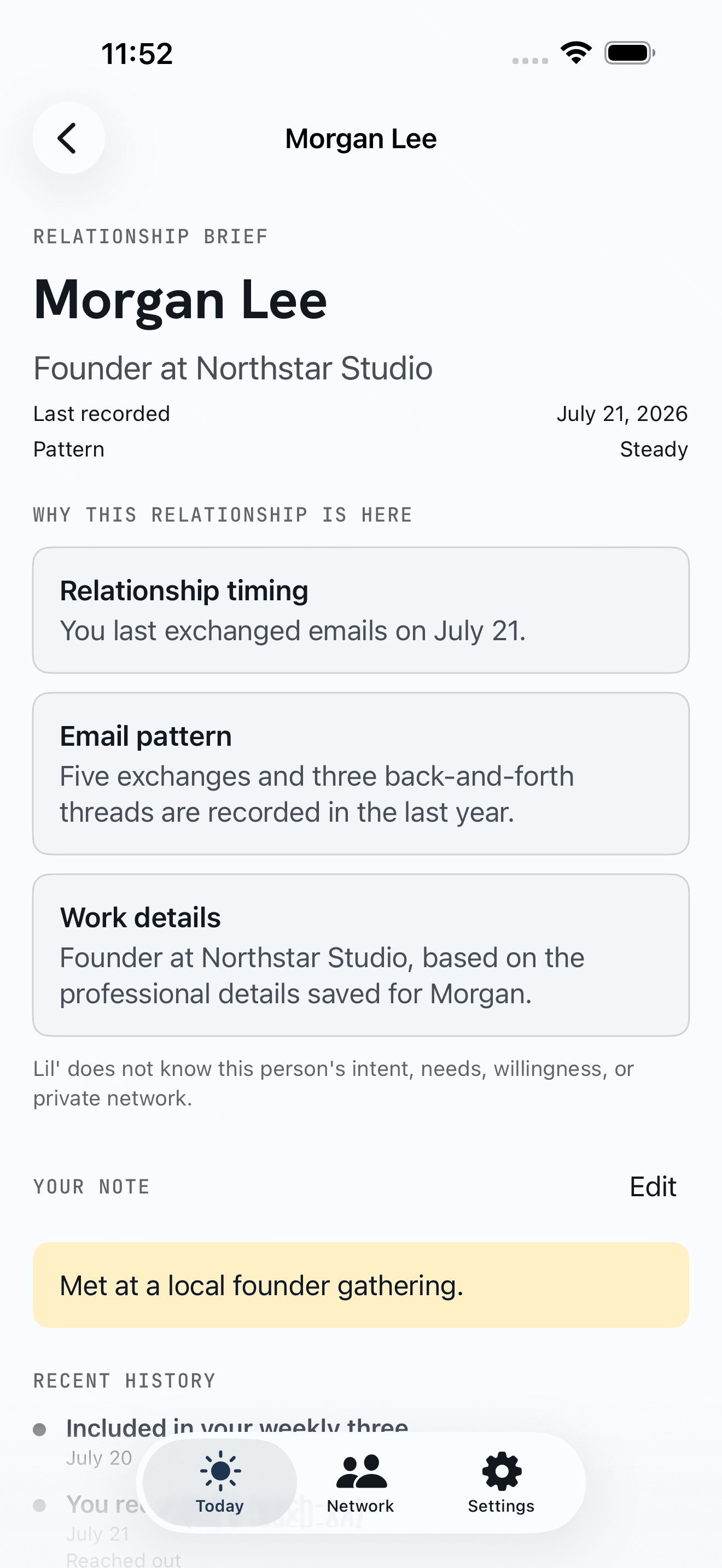
Lil’ has a free plan and a paid one. Free helps you work toward one active goal with three people to reconnect with each week, 90 days of relationship history, and one extra set when you need it. Paid is $12 a month or $120 a year. It adds Today, Ask Lil’, full relationship briefs, progress tracking, and a full year of history.
Can I control when the digest shows up?
Your weekly digest lands on the day and time you pick, in your timezone. Change it whenever you like, skip a week, or pause from Settings. Today sends a separate short email, at most once a day. It has its own on/off switch in Settings.

A best-selling networking book, now automated.
The Little Book of Networking, Kurt Schmidt’s Amazon best seller, lays out one simple system: keep your network warm on a steady rhythm, before relationships go cold. Lil’ runs that weekly rhythm and catches useful timing in between.
The book on AmazonYour next good conversation is already in your inbox.
Pick a goal. Lil’ will help you reach the people who can move it forward.
No card required. See what Lil’ reads before you connect Gmail.